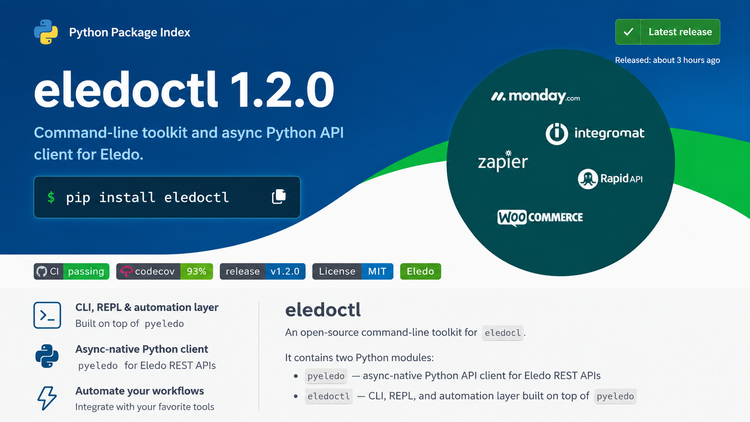
In the previous article, I introduced eledoctl, a command-line tool I built for Eledo.
But that article did not tell the full story.
The public PDF-generation functionality was not the original reason the tool was created. That part felt almost easy because I had already implemented similar API flows in the Eledo n8n community node.
The real reason for eledoctl was documentation synchronization.
This article is about that deeper layer.
A custom Markdown transformer.
A CMS uploader.
A Git-first documentation workflow.
And the architectural decision that made the whole system sustainable.
The Problem
Eledo uses a custom CMS to host its documentation.
When I started supporting the product, one of my tasks was to bring more clarity, infrastructure, and process discipline to the documentation.
So when I began rewriting and refactoring the docs, I also rebuilt the system around them.
Git.
Versioning.
Local development.
Docusaurus as the documentation platform.
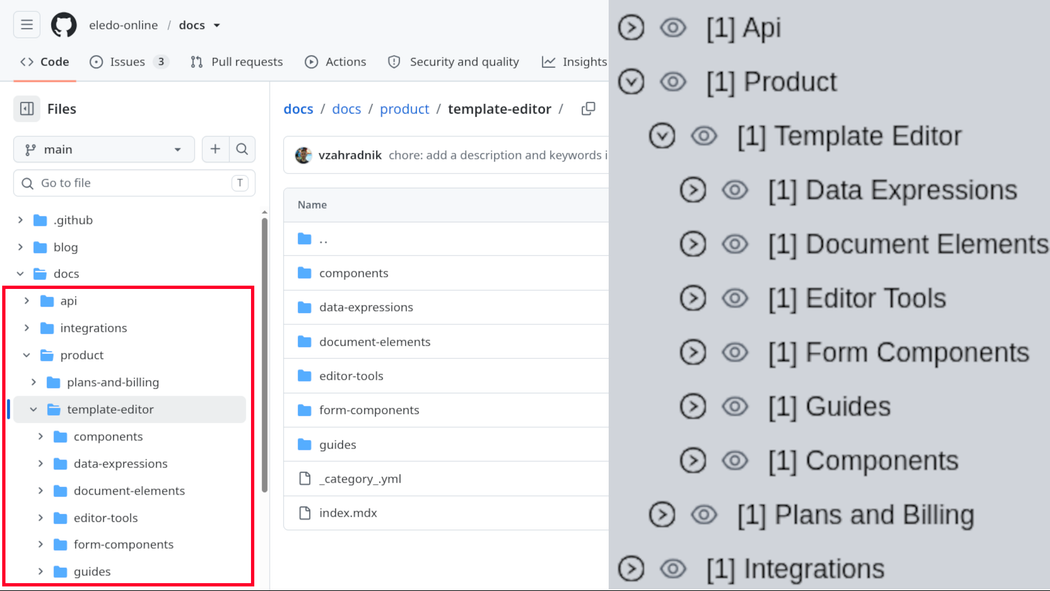
I have covered that documentation migration in a separate article, but the short version is this:
After a few months, I had a polished documentation system in Git.
This was not just about my personal preference.
Git made the work faster.
It gave me history, reviewability, branching, local editing, pull requests, search, refactoring, and confidence.
If I had been forced to work directly inside the custom CMS, I might still be refactoring the documentation today.
My client liked the Docusaurus version.
But there was a complication.
He did not want to abandon the existing CMS.
And to be fair, I understood why.
The CMS was already integrated with internal tooling and product workflows. It was not just a publishing interface. It was part of the product’s infrastructure.
My original proposal was to build a custom Docusaurus plugin that would integrate with the CMS.
In that model, Git would remain the content source of truth, while the CMS would provide metadata and product integration.
I am still convinced that solution could work.
But the founder wanted the CMS to remain the final publishing system.
That created a problem.
By that point, I had written or rewritten over 180 documentation files.
Updating them manually between two publishing systems was technically possible, but it would be tedious, fragile, and anti-systematic.
You cannot build a serious documentation process that says:
After your pull request is approved, manually copy files into another publishing platform and hope nothing diverges.
That is not a process.
That is an invitation to entropy.
Git as Source of Truth
Docusaurus and Git gave us control.
Auditability.
Version history.
Review.
Branching.
Diffs.
Rollback.
The custom CMS was the opposite.
In theory, anyone with access could update anything directly in the CMS. A document could be rewritten, modified, or accidentally diverge from the Git version, and we might not notice immediately.
That was unacceptable.
Both the founder and I agreed that an automated sync tool was necessary.
The important question was direction.
Should Git sync to the CMS?
Or should the CMS also sync back into Git?
The founder initially proposed merging CMS content back into Git. From his perspective, that looked like simplification.
From my perspective, it looked like pollution of the system I had just built.
Git had become the clean source of truth.
I did not want CMS state leaking back into it.
So I persuaded him to keep Git authoritative.
The agreement was simple:
- Git remains the source of truth.
- Docusaurus remains the authoring and review environment.
- The CMS remains the publishing target.
- A custom tool transforms and uploads Git content into the CMS.
- The CMS does not write back into Git.
I only needed one thing from the founder:
An API to create, read, and update CMS articles.
Once that existed, I could build the rest.
Why I Accepted the Unpaid Work
There was one practical complication.
This tool was not part of the paid scope.
I could build it, but the development cost was on me.
I accepted that because I knew the alternative would be worse.
I expected to work with this documentation system for months, maybe years. Manually fighting the CMS every time I wanted to publish documentation would cost me far more energy over time than building the tool once.
So I made the trade.
One week of my time in exchange for long-term sanity.
That was worth it.
The goal was simple:
Take raw Markdown files built for Docusaurus.
Transform them into CMS-compatible Markdown.
Upload them automatically.
Produce detailed logs.
Show what changed.
Allow dry runs.
Support manual inspection.
Eventually run inside GitHub Actions.
In other words:
Keep Git clean.
Keep the CMS updated.
Keep humans out of repetitive copy-paste work.
eledoctl internal
At first, I considered building two separate tools:
One public CLI tool for users.
One private internal tool for our own CMS synchronization.
But that felt unnecessary.
The public CLI already existed.
The package structure was already there.
The authentication layer was already there.
The API wrapper was already there.
So I added an internal command subtree to eledoctl.
eledoctl internal --help
Usage: eledoctl internal [OPTIONS] COMMAND [ARGS]...

  Internal Eledo operational tooling.

Options:
  -h, --help  Show this message and exit.

Commands:
  docs  Internal documentation synchronization tooling.
The public CLI already existed, so the CMS synchronization layer could live behind an internal command subtree instead of becoming a separate tool.
At the moment, this internal section handles only the CMS sync operation.
Yes, it uses a private and undocumented API.
But the risk is minimal.
The API still requires authentication, and users need the right permissions to modify data on the server. Exposing the command structure does not magically grant access to the CMS.
So the simplest architecture won.
One tool.
Public commands for public workflows.
Internal commands for our own operational needs.
Docusaurus Markdown Transformation
Markdown seems simple until you try to transform it reliably.
Docusaurus Markdown is not just plain Markdown.
It can contain frontmatter.
MDX imports.
Custom React components.
Admonitions.
Local links.
Image references.
Documentation-specific assumptions.
The CMS supported only a simpler Markdown dialect, so the transformer had to bridge the gap.
Some of the required operations were:
- remove frontmatter and pass metadata to the uploader,
- remove unsupported MDX imports,
- remove unsupported custom MDX components,
- convert supported custom components into CMS-compatible Markdown,
- convert my custom Docusaurus image component into standard Markdown images,
- convert admonitions into a CMS-compatible format,
- patch internal documentation links,
- patch image URLs,
- detect whether the remote document already has identical content.
Each individual transformation looked manageable.
Together, they became a real system.
The Interesting Part: Link Patching
The most interesting part was link patching.
Imagine a Markdown file in Docusaurus linking to another local Markdown file.
That link works inside the Git/Docusaurus documentation tree.
But inside the CMS, it is invalid.
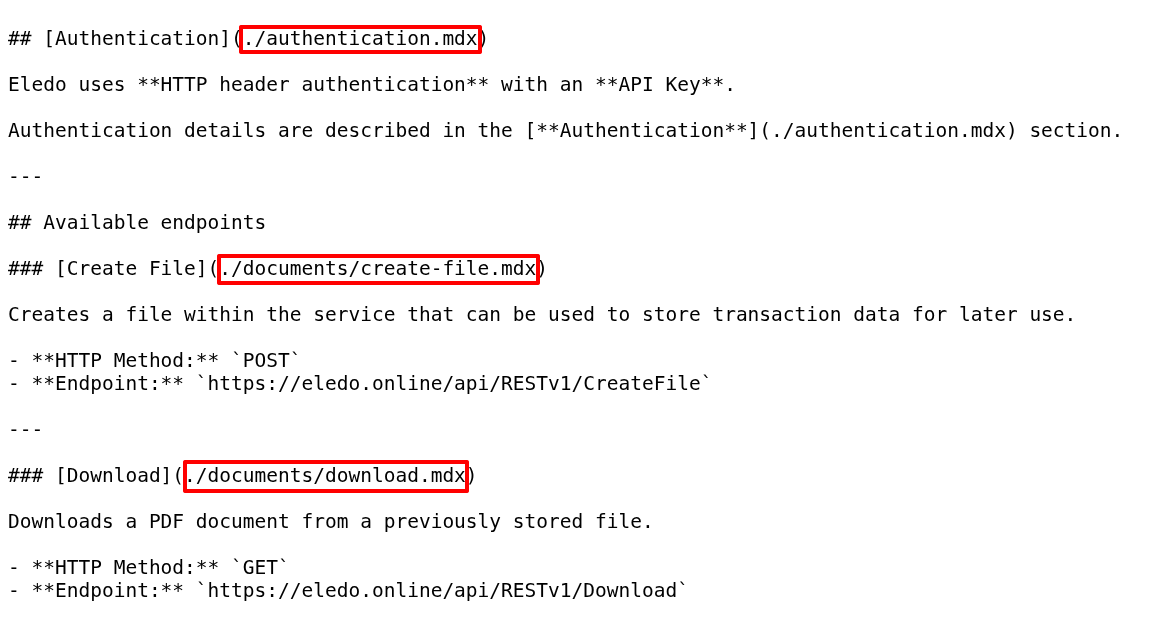
The CMS has its own hierarchy, its own article IDs, and its own generated URLs.
So the transformer could not simply preserve local Markdown links.
It had to translate them.
The process looked roughly like this:
- read the source document,
- detect links pointing to local documentation files,
- resolve the referenced document,
- find the corresponding CMS article,
- extract the correct CMS URL,
- replace the original local link in the source document.
One detail mattered a lot:
The source document was patched.
The referenced document was not.
This kept the transformation direction clear.
A document being transformed may use information from another document, but it does not mutate that other document.
That kind of boundary matters when code grows.
Chain of Transformations
Because the transformer had many responsibilities, I did not want one large function trying to do everything.
Instead, I built a chain of transformations.
Each step performs one specific operation.
Each transformation can be enabled or disabled.
@dataclass(frozen=True, slots=True)
class TransformOptions:
    """Options controlling which transformation stages are applied."""

    normalize_line_endings: bool = True
    strip_frontmatter: bool = True
    remove_imports: bool = True
    convert_admonitions: bool = True
    convert_supported_images: bool = True
    remove_unsupported_jsx: bool = True
    patch_links_from_reference: bool = True
    patch_images_from_reference: bool = True
Each Markdown transformation can be enabled or disabled independently, which keeps the pipeline ready for future CMS capabilities without rewriting the whole transformer.
By default, all transformations are enabled.
But the design gives us flexibility.
For example, if the CMS eventually adds native support for admonitions, I do not need to rewrite the entire transformer. I can simply disable the admonition conversion and pass the original syntax through.
Maybe that support will never come.
That is fine.
The tool is ready either way.
This is one of the benefits of designing for change without over-engineering.
The transformer is not generic in the abstract enterprise sense.
It is specific to our needs.
But it is modular enough to survive product changes.
The Uploader
Compared to the transformer, the uploader was easier to write.
But easier does not mean trivial.
The uploader had to:
- traverse the local documentation tree,
- build correct slugs,
- read frontmatter metadata,
- fetch remote CMS articles,
- detect missing remote documents,
- detect changed remote documents,
- upload transformed content,
- update metadata,
- support partial subtree uploads,
- support single-file uploads,
- log everything clearly.
Then came the product-specific edge cases.
And this is where I was glad I was not building a generic synchronization framework.
I was building a tool for our documentation system.
That gave me freedom.
I could solve the real problem directly instead of abstracting the code into a universal monster.
eledoctl internal docs sync /home/vzahradnik/Klienti/Eledo/docs/docs/   --tag "v1.0.1"   --log-file sync-docs-v1.0.0-upload.json   --inspect-file sync-docs-v1.0.0-upload.txt --dry-run
Source root: /home/vzahradnik/Klienti/Eledo/docs/docs
Selection: /home/vzahradnik/Klienti/Eledo/docs/docs
Destination root: /documentation
Files: 183
Dry run: True

Uploading  [####################################]  183/183
Sync log written to: sync-docs-v1.0.0-upload.json
Manual inspection list written to: sync-docs-v1.0.0-upload.txt

Summary:
  total: 183
  created: 0
  updated: 23
  skipped: 160
  unpublished: 0
  warnings: 0
  failures: 0
A dry run gives the synchronization process a safety layer: 183 files inspected, 23 marked for update, 160 skipped, and nothing written remotely yet.
One essential feature was --dry-run.
I wanted the workflow to feel closer to tools like rsync.
Before writing anything remotely, I wanted to see what would happen.
Which files would be created?
Which files would be updated?
Which files would be skipped?
Which files needed manual inspection?
A synchronization tool without dry-run is a dangerous tool.
Especially when the remote side is a CMS used in production.
{"action": "skip-unchanged", "dry_run": true, "messages": [], "order": 1, "source": "/home/vzahradnik/Klienti/Eledo/docs/docs/api/index.mdx", "status": "success", "target": "/documentation/api", "title": "Api", "uploaded": false}
{"action": "skip-unchanged", "dry_run": true, "messages": [], "order": 1, "source": "/home/vzahradnik/Klienti/Eledo/docs/docs/integrations/index.mdx", "status": "success", "target": "/documentation/integrations", "title": "Integrations", "uploaded": false}
{"action": "skip-unchanged", "dry_run": true, "messages": [], "order": 1, "source": "/home/vzahradnik/Klienti/Eledo/docs/docs/product/index.mdx", "status": "success", "target": "/documentation/product", "title": "Product", "uploaded": false}
{"action": "skip-unchanged", "dry_run": true, "messages": [], "order": 2, "source": "/home/vzahradnik/Klienti/Eledo/docs/docs/api/authentication.mdx", "status": "success", "target": "/documentation/api/authentication", "title": "Authentication", "uploaded": false}
{"action": "skip-unchanged", "dry_run": true, "messages": [], "order": 1, "source": "/home/vzahradnik/Klienti/Eledo/docs/docs/api/documents/index.mdx", "status": "success", "target": "/documentation/api/documents", "title": "Documents", "uploaded": false}
{"action": "skip-unchanged", "dry_run": true, "messages": [], "order": 1, "source": "/home/vzahradnik/Klienti/Eledo/docs/docs/api/templates/index.mdx", "status": "success", "target": "/documentation/api/templates", "title": "Templates", "uploaded": false}
The sync log records exactly what happened to each document, making the upload process auditable instead of relying on guesswork or manual inspection alone.
Detecting Drift
One of the most important responsibilities was detecting drift.
If the Git version and the CMS version are identical, the uploader should skip the document.
If the CMS version differs, the uploader should detect the change and decide what to do.
This matters because synchronization tools can easily become noisy.
If every run uploads everything, you lose signal.
If every run produces too much output, you stop reading the logs.
I wanted the tool to show meaningful differences.
Unchanged files should disappear into the background.
Changed files should be visible.
Suspicious cases should require inspection.
That is how automation earns trust.
Unit Tests Became Critical
In the previous article, I wrote that unit tests gave me confidence when shipping the public PDF-generation functionality.
That was true.
But for the Markdown transformer and uploader, tests were even more important.
There is no way I could have built this reliably without a proper test suite.
I spent several hours writing tests for the transformer alone.
First, I tested transformations in isolation.
Then I tested full real-world transformation scenarios.
The uploader was simpler than the transformer, but it still covered a large amount of behavior:
- file filtering,
- selective uploads,
- missing remote documents,
- changed content,
- unchanged content,
- metadata handling,
- moved or deleted documents,
- dry-run behavior.
I probably spent as much time testing the uploader as I spent implementing it.
Maybe more.
And it was worth it.
The tests became most valuable when I started implementing edge cases.
Many of those fixes required changes to core transformer or uploader logic.
Without tests, every change would have forced me into manual CMS testing.
Instead, I could make the change, run the suite, and see whether the system still behaved correctly.
Green tests did not replace thinking.
But they gave me a safety net.
And that safety net allowed me to finish the tool instead of getting stuck in fear of breaking something.
Why This Was Worth Building
This project was unpaid.
But it was not wasted time.
It gave me better infrastructure.
It protected the Git-based documentation workflow.
It reduced future manual work.
It made publishing safer.
It gave us a path toward GitHub Actions automation.
It turned a fragile copy-paste process into a repeatable tool.
And it kept me sane.
That last part matters more than it may sound.
A bad process drains energy every time you touch it.
A good tool saves energy every time it runs.
That is why internal tooling is often worth building even when nobody explicitly budgets for it.
Conclusion
This was a genuinely fun project.
There is a strange irony in the fact that some of the most interesting work — the work that gives me the most curiosity and energy — sometimes happens outside the paid scope.
But I learned a lot.
I solved a real operational problem.
I created a tool that will keep helping me and the client in the future.
And because the public part of eledoctl is open source, anyone interested can inspect the code and learn from the implementation details.
The original purpose still stands:
Build better infrastructure so humans do not have to compensate for bad process forever.
For me, that is a success.